








-
Adding the IPv6 Address
-
Open the Control Panel.
-
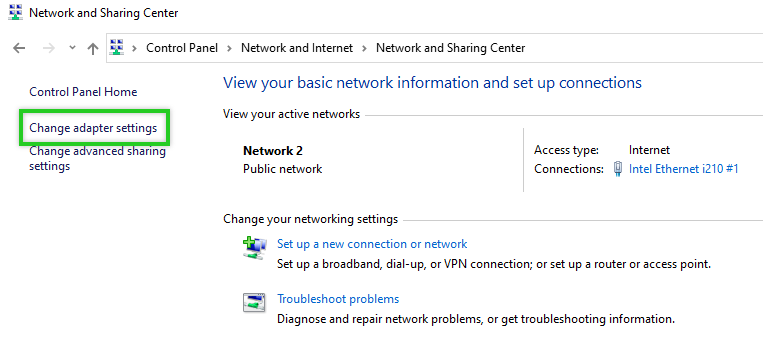
Click Network and Internet > Network and Sharing Center > Change Adapter Settings.
-
Right-click on the network adapter.

-
Click Properties.
-
Double-click Internet Protocol Version 6 (TCP / IPv6).
-
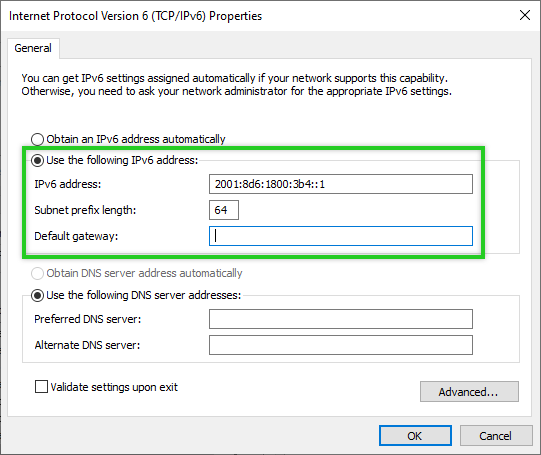
Enable the Use the following IPv6 address option.
-
In the IPv6 Address field, type the IPv6 address assigned to the server.
-
Click in the Subnet prefix length field. The subnet prefix length is then entered automatically.
Note
You may receive a warning that the gateway is in a different subnet. You can ignore this warning. In this case, simply confirm with YES that the configuration is to be saved.
Note
If the server is not reachable via either the main IP address or the additional public IP address after the changeover, you can log in to the server using the KVM console to check the configuration.
-
Click Add.

-
In the IPv6 Address field, type the IPv6 address that is assigned to the server.
-
Click in the Subnet prefix length field. The subnet prefix length is then entered automatically.
-
Click Add.

-
Confirm the still open dialogues with OK.
-

-
ServicesBrowse
VPS Hosting
-
AMD Ryzen VPSPopularSA's Fastest VPS! Powered by zen 5 Ryzen9 CPUs and NVMe Storage
-
Linux VPSOur KVM Linux VMs provide a typical balance of CPU, RAM, and NVMe Resources
-
Windows VPSOur Windows VMs provide a typical balance of CPU, RAM, and NVMe Resources powered by Microsoft Server.
-
Memory Optimised Linux VPSLinux VPS with up to 256GB of RAM
-
Memory Optimised Windows VPSMicrosoft Server VPS with up to 256GB of RAM
-
Storage Optimised Linux VPSNEWMemory Optimised Linux VPS with up to 32 TB
-
Storage Optimised Windows VPSNEWMemory Optimised Windows VPS with up to 32 TB
General Hosting-
Business EmailPromailMailboxes up to 100GB, All Business features including Antispam and 2FA. All email accounts are protected by a powerful and professional Email Security solution.
-
cPanel HostingLightning-fast web hosting with enterprise-grade hardware. LiteSpeed Hosting with cPanel Approved Partner.
-
Managed cPanel HostingPremium managed hosting built specifically for high-performance eCommerce Sites.
-
Pastel HostingSecure cloud hosting that keeps your accounting software online 24/7 protected from Ransomware.
-
Cloud Backup100GbitProtect your valuable data with Secure Cloud backups! All data stored locally in South Africa
-
Wireguard VPNSecure Access to your server using the fastest VPN protocol supported on all platforms, Easy Setup.
Bare Metal Servers-
Dedicated ServersWith NVMePowerful Bare Metal Servers from SA's Leading Dedicated Server Provider.
-
Proxmox SubscriptionsRackzar is South Africa's trusted authorised Proxmox partner, delivering powerful open-source virtualisation, backup, and email security solutions.
- Domains & SSL
-
Registrace nové doményFind your perfect domain name for your website.
-
Převod domén k námTransfer your existing Domain to Rackzar, easy DNS manager included.
-
SSL CertificatesBrowse from our range of SSL's from single to Wildcard SSL's.
-